 | InDesign SDK 20.5 |
#include <PathBoundsOutlineInfo.h>
Public Member Functions | |
| PathBoundsOutlineInfo (const PMMatrix &xForm) | |
| const PMRect & | GetBoundingBox () const |
| void | ResetBounds () |
| virtual void | BeginPath () |
| virtual void | EndPath () |
| virtual void | moveto (const PMReal &x, const PMReal &y) |
| virtual void | lineto (const PMReal &x, const PMReal &y) |
| virtual void | curveto (const PMReal &x1, const PMReal &y1, const PMReal &x2, const PMReal &y2, const PMReal &x3, const PMReal &y3) |
| virtual void | closepath () |
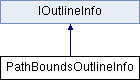
Concrete implementation of IOutlineInfo. Intended to be used as a glue class for calculating a path's bounding box using information from IPathGeometry and other interfaces that use IOutlineInfo.
| PathBoundsOutlineInfo::PathBoundsOutlineInfo | ( | const PMMatrix & | xForm | ) |
Constructs a PathBoundsOutlineInfo using the specified matrix. The matrix is used to transform input points before calculating the bounding box.
| xForm | IN The matrix by which to transform input points |
| virtual |
Begins a new path. Called before any of the other methods is called.
Implements IOutlineInfo.
| virtual |
Closes the current subpath. If the first point in the subpath (defined by a prior call to moveto) does not correspond to the current point, this call will implicitly add a line segment from the current point to the first point in the subpath.
The current point is undefined after a call to closepath. The caller must call moveto to start a new subpath and establish the current point before calling either lineto, curveto, or closepath.
Implements IOutlineInfo.
| virtual |
Adds a new bezier curve segment to the current subpath, using four control points. The current point in user space at the time the call is made is used as the starting point for the curve. (x1, y1) and (x2, y2) are used as control points defining the degree of curvature and magnitude of the curve, and (x3, y3) defines the end point. The current point is implicitly set to (x3, y3).
| x1 | IN The x-component for the first control point of the new bezier segment |
| y1 | IN The y-component for the first control point of the new bezier segment |
| x2 | IN The x-component for the second control point of the new bezier segment |
| y2 | IN The y-component for the second control point of the new bezier segment |
| x3 | IN The x-component for the end point of the new bezier segment |
| y3 | IN The y-component for the end point of the new bezier segment |
Implements IOutlineInfo.
| virtual |
Ends a path begun by BeginPath.
Implements IOutlineInfo.
| const PMRect& PathBoundsOutlineInfo::GetBoundingBox | ( | ) | const |
Returns the computed bounds.
Adds a line segment to the current subpath. The beginning of the segment is the current point in user space at the time the call is made. The end is (x, y). Implicitly sets the current point to (x, y).
| x | IN The x-component for the end point of the new line segment |
| y | IN The y-component for the end point of the new line segment |
Implements IOutlineInfo.
Starts a new subpath. The current point in user space is set to (x, y).
| x | IN The x-component of the new current point |
| y | IN The y-component of the new current point |
Implements IOutlineInfo.
| void PathBoundsOutlineInfo::ResetBounds | ( | ) |
Clears the calculated bounding box
 1.8.3.1
