 | InDesign SDK 20.5 |
#include <IQuickApplyService.h>
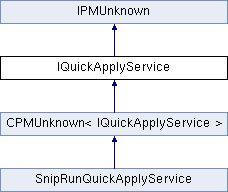
Public Types | |
| enum | { kDefaultIID = IID_IQUICKAPPLYSERVICE } |
Public Member Functions | |
| virtual void | BeginServiceSession ()=0 |
| virtual void | EndServiceSession ()=0 |
| virtual TypesHandledList | GetItemTypesHandled (const TypesHandledList &existingItemTypes)=0 |
| virtual void | LoadItems (IActiveContext *ac, K2Vector< QuickApplyFindListNode > *masterList, IdleTimer *timeCheck, uint32 itemTypeToLoad)=0 |
| virtual bool16 | LoadItemsIsComplete (uint32 idType)=0 |
| virtual bool16 | ApplyItem (IActiveContext *ac, const QuickApplyFindListNode &itemToApply, IEvent *e, bool16 edit)=0 |
| virtual void | ResetProvider ()=0 |
 Public Member Functions inherited from IPMUnknown Public Member Functions inherited from IPMUnknown | |
| virtual IPMUnknown * | QueryInterface (PMIID interfaceID) const =0 |
| virtual void | AddRef () const =0 |
| virtual void | Release () const =0 |
An interface used to provide items to the quick apply dialog. Parties who want to add new types of items to the quick apply dialog are expected to make an service provider with their item described via this interface.
| anonymous enum |
Standard enum to for use with GetDefaultIID() method.
| pure virtual |
When the user selects an item from the quick apply dialog and does the apply action this routine will be called. If the item passed in is one that your implementation owns then it should do it's apply action for that item.
| ac | active context to apply item into. |
| itemToApply | item in the quick apply dialog that was selected when apply was selected. |
| e | (may be nil) an event which can be used to determine any special types of apply that may happen. For example, if the option key is held down paragraph styles will apply differently than if no modifiers are active. |
| edit | open up an edit dialog rather than apply where applicable (i.e. styles). |
Implemented in SnipRunQuickApplyService.
| pure virtual |
This is called just after the quick apply dialog opens to give the service provider a chance to initialize any activity it needs to.
| allocator | class to allocate id types for the service provider. |
Implemented in SnipRunQuickApplyService.
| pure virtual |
This is called just before the quick apply dialog closes to give the service provider a chance to clean up any data storage it has allocated.
Implemented in SnipRunQuickApplyService.
| pure virtual |
When this routine is called the service provider should return a list of the types of items it is responsible for.
| existingItemTypes | A list of types already known up to the point when this routine is called. You may not return a prefix key that is already existing. Use this to make sure new prefix keys are unique. |
Implemented in SnipRunQuickApplyService.
| pure virtual |
The implementor of this routine should append a list of items to be displayed in quick apply dialog through the masterList parameter. Note Items may already be present in the master list don't delete existing items!
| ac | the active context for the application (useful to determine what items should be loaded). |
| masterList | this is a return parameter this routine will append new items (if any) to the end of this list. |
| timeCheck | if timecheck is not nil then an implementation of this method should save it's state a return when this timeCheck reaches 0. |
| itemTypeToLoad | the type of items to load. |
Implemented in SnipRunQuickApplyService.
| pure virtual |
Each provider is expected to know whether it has completed loading of it's items or not. This is to support the partial loading of sort items for those that may take extended times to load. The LoadItems() routine may be called multiple times (called via an idle task) and during each one those some (or all) items will be loaded in the quick apply dialog. This let's the dialog open instantly although the loading of all items may take some short amount of time to all load after that. The user can start typing immediatly and by the time he finishes (or sooner) typically all items will be loaded. Providing a smooth studder free experience. At BeginServiceSession() time you should clear whatever flag(s) are used to indicate whether the LoadItemsIsComplete() then set them as necessary after LoadItems() is called.
Implemented in SnipRunQuickApplyService.
| pure virtual |
The dialog can at certain infrequent times ask a service provider to reset. What this means is the that the service implimentor should prepare itself to have the LoadItems() routine called again like it does when the dialog opens. Typically this would be called in the case of a item type being activated/deactivated.
Implemented in SnipRunQuickApplyService.
 1.8.3.1
