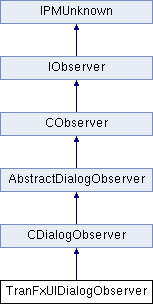
Implements a dialog observer based on CDialogObserver

that handles widget changes made by the user in this

plug-in's previewable dialog.


Changes to the transparency effect are made

via the suite ITranFxSuite.


The description below talks about how commands get processed

in previewable dialogs. Note however that this dialog does not process

commands directly. Instead, it calls the suite that controls the

effect, ITranFXSuite, that in turn calls a facade, TranFxUtils,

that processes the commands. So the dialog works in tandem with

the suite and the commands that it processes. However, it is

important to understand the special way in which commands are

handled during a previewable dialog, as given below.


Modal dialogs can have a preview checkbox.  The preview checkbox

allows the user to see the immediate effect on the document of

modifying some dialog control.


A previewable dialog works like this. Typically it

is implemented more like a panel in that each control has an

observer that results in a command being processed to change something when

clicked. In this implementation we have one observer watching

all the widgets in the dialog for change. Each time a widget

changes we make a suite call that processes a command to make

the requested change.


When the preview checkbox is turned off commands are buffered.

When the preview checkbox is turned on buffered commands are

processed. When the preview checkbox is turned off again the

commands are undone. When the dialog is dismissed with the OK

button buffered commands are processed.


Adding a preview checkbox to you modal dialog will give you:

<ul>

<li>buffering of commands when preview is not checked.

<li>undoing of previewed commands when the dialog is cancelled.

<li>grouping of commands into a single compound command.

<li>replacement of commands with the same ICommand::GetCreatorID.

i.e. if you process a command with the same creator id more than

once the previous command is undone and replaced by the new command.

So if you click 10 times to set the x offset to a different

value only the last set x offset command is processed. See

the methods in TranFxUtils that gets called by ITranFxSuite

for examples of how this is done.

</ul>


A preview checkbox is created by an ODFRez statement like this:

<pre>
Note the preview button CheckBoxWidget ( kPreviewButtonWidgetID, // WidgetId kSysCheckBoxPMRsrcId, // RsrcId kBindNone, Frame(192,76,272,96) // Frame kTrue, // Visible kTrue, // Enabled TriStateControlAttributes kAlignLeft, // fAlignment CTextControlData "Pre&view" // Initial text )
You can have a preview checkbox but disable all of the processing described above simply by using replacing kPreviewButtonWidgetID with a WidgetID of your own. You would then have to implement your own command management using command sequences or whatever to achieve the result you want.
- See Also
- ITranFxSuite
- TranFxUtils

 Public Member Functions inherited from CDialogObserver
 1.8.3.1
