 | InDesign SDK 20.5 |
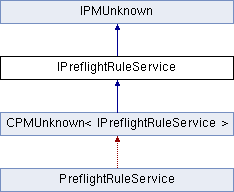
Public Types | |
| enum | { kDefaultIID = IID_IPREFLIGHTRULESERVICE } |
Public Member Functions | |
| virtual PreflightRuleIDVector | GetAllRules () const =0 |
| virtual PMString | GetRuleCategory (const PreflightRuleID &ruleID) const =0 |
| virtual PMString | GetRuleSortValue (const PreflightRuleID &ruleID) const =0 |
| virtual IPreflightRuleInfo * | CreateRule (const PreflightRuleID &ruleID, IDataBase *db) const =0 |
 Public Member Functions inherited from IPMUnknown Public Member Functions inherited from IPMUnknown | |
| virtual IPMUnknown * | QueryInterface (PMIID interfaceID) const =0 |
| virtual void | AddRef () const =0 |
| virtual void | Release () const =0 |
| pure virtual |
Given the provided rule ID, create a rule boss that corresponds to it. The new rule should be initialized to default values. If the database passed is nil, create an in-memory rule; otherwise create one in the specified database.
| ruleID | IN The ID of the rule. |
| db | IN The database in which the rule boss should be created (nil if in memory). |
Implemented in PreflightRuleService.
| pure virtual |
Provide a list of all the rules (by their IDs) that you offer. This is used to create lists of rules to present to the user, as well as to build a master table for use when parsing through XML rule data looking for the right rule service to instantiate that rule.
Implemented in PreflightRuleService.
| pure virtual |
Get the category a given rule belongs to. Categories are used to organize the UI and results by grouping together like rules. If you return an empty string the rule will not appear in the UI or aggregated results.
See PreflightStringConstants for a list of the standard ones if you want your rule to appear alongside the InDesign native ones. But you can come up with whatever you like; if you want all your rules to appear under your company name, you can certainly do that. The list of categories is built dynamically at startup based on the rule services available.
| ruleID | The rule you're interested in. |
Implemented in PreflightRuleService.
| pure virtual |
Get the sorting string for a given rule. This allows rules to be ordered in a consistent and designed manner. This is similar to how menu items are arranged but uses a string similar to how many other elements are sorted in the preflight APIs.
Implemented in PreflightRuleService.
 1.8.3.1
