 | InDesign SDK 20.5 |
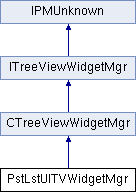
Public Member Functions | |
| PstLstUITVWidgetMgr (IPMUnknown *boss) | |
| virtual bool16 | ApplyDataToWidget (const NodeID &node, IPanelControlData *widgetList, int32 message) const |
| virtual PMReal | GetIndentForNode (const NodeID &node) const |
| void | RegisterStyles () |
 Public Member Functions inherited from CTreeViewWidgetMgr Public Member Functions inherited from CTreeViewWidgetMgr | |
| CTreeViewWidgetMgr (IPMUnknown *boss) | |
| CTreeViewWidgetMgr (IPMUnknown *boss, int32 optionFlags) | |
| virtual | ~CTreeViewWidgetMgr () |
| virtual bool16 | ApplyNodeIDToWidget (const NodeID &node, IControlView *widget, int32 message=0) const |
| virtual PMReal | GetNodeWidgetHeight (const NodeID &node) const |
| virtual PMReal | GetNodeWidgetWidth (const NodeID &node) const |
| virtual IControlView * | CreateWidgetForNode (const NodeID &node) const |
| virtual void | SetStyle (int32 styleIdentifier) |
| virtual int32 | GetStyle () const |
| virtual WidgetID | GetWidgetTypeForNode (const NodeID &node) const |
| virtual void | PreDeleteWidget (IControlView *widget) |
Widget Factory and reuse | |
Widget placement | |
Widget Style - The tree view may have different looks, i.e. Large vs. Small palette rows | |
| Public Member Functions inherited from IPMUnknown | |
| virtual IPMUnknown * | QueryInterface (PMIID interfaceID) const =0 |
| virtual void | AddRef () const =0 |
| virtual void | Release () const =0 |
Additional Inherited Members | |
| Public Types inherited from ITreeViewWidgetMgr | |
| enum | { kDefaultIID = IID_ITREEVIEWWIDGETMGR } |
| Protected Types inherited from CTreeViewWidgetMgr | |
| enum | Options { kList = 0, kHierarchical = 1 } |
| Protected Member Functions inherited from CTreeViewWidgetMgr | |
| virtual void | ApplyIndentToWidget (const NodeID &node, IPanelControlData *widgetList, int32 message=0) const |
| virtual PMReal | GetBaseIndentOffset (IControlView *styleWidget) const |
| virtual PMReal | GetTreeViewWidth () const |
| virtual void | ApplyHighlightToWidget (const NodeID &node, IControlView *widget, int32 message=0) const |
| virtual PMReal | GetIndent (const NodeID &node) const |
| virtual void | RegisterStyleWidget (int32 style, RsrcID widgetRsrcID, PluginID pluginID) |
| virtual void | HideExpanderIfNotExpandable (const NodeID &node, IPanelControlData *widgetList, int32 message=0) const |
| virtual void | SetNodeName (IPanelControlData *widgetList, const PMString &name, WidgetID nameWidget=kTreeNodeNameWidgetID) const |
| virtual void | SetNodeIcon (IPanelControlData *widgetList, RsrcID iconRsrc, PluginID pluginID=0, WidgetID iconWidget=kTreeNodeIconWidgetID) const |
| virtual bool16 | IsOptionSet (Options option) const |
| virtual void | SetSelectableDlgDrawNodeSeparatorOff (IControlView *widget) const |
Tree view widget manager
| virtual |
Most TreeViews will override this method. This method is called from ApplyNodeIDToWidget() to apply the Node specific data to the widgets within the main node widget. Typically, the name of the node and icon for the node are applied to a Text widget and an icon widget. When overriding this method, the base class version is not typically called.
| node | the node whose data you want applied to the given widget |
| widgetList | This is the IPanelControlData of the Tree node widget. The Tree node widget typically contains subwidgets which are changed based on the specific data for the given node. |
| message | if you call an ITreeViewMgr method with a message, that message will be passed back to you in this parameter. For instance, if it is expensive to update the text, but not the icon. You could pass yourself a kMyIconChanged message in ITreeViewMgr::NodeChanged() and then only update the icon in ApplyDataToWidget() if message=kMyIconChanged |
Reimplemented from CTreeViewWidgetMgr.
Returns indent in pixels for widget rendering given node.
| node |
Reimplemented from CTreeViewWidgetMgr.
| inlinevirtual |
This method is where you specify the widget that should be used for each of the Tree Styles you support. If you only support 1 Tree Style, then you need only Register one style in from this method. This method is automatically called when it is time to register your styles. Inside you should call RegisterStyleWidget() to asssociate a widget with a style.
If your tree can contain different widgets depending on the NodeID, then you should use override CreateWidgetForNode instead of this RegisterStyles() method
This default implementation registers the standard Tree widgets for large and small palette rows. If you aren't using the standard widgets, then override this and DON'T CALL the base class method.
Reimplemented from CTreeViewWidgetMgr.
 1.8.3.1
