 | InDesign SDK 20.5 |
#include <CTreeViewWidgetMgr.h>
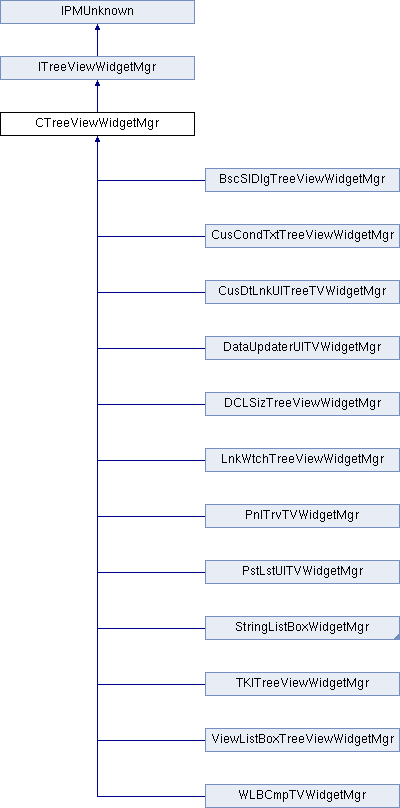
Public Member Functions | |
| CTreeViewWidgetMgr (IPMUnknown *boss) | |
| CTreeViewWidgetMgr (IPMUnknown *boss, int32 optionFlags) | |
| virtual | ~CTreeViewWidgetMgr () |
| virtual bool16 | ApplyNodeIDToWidget (const NodeID &node, IControlView *widget, int32 message=0) const |
| virtual PMReal | GetNodeWidgetHeight (const NodeID &node) const |
| virtual PMReal | GetNodeWidgetWidth (const NodeID &node) const |
| virtual PMReal | GetIndentForNode (const NodeID &node) const |
| virtual IControlView * | CreateWidgetForNode (const NodeID &node) const |
| virtual void | SetStyle (int32 styleIdentifier) |
| virtual int32 | GetStyle () const |
| virtual WidgetID | GetWidgetTypeForNode (const NodeID &node) const |
| virtual void | PreDeleteWidget (IControlView *widget) |
Widget Factory and reuse | |
Widget placement | |
Widget Style - The tree view may have different looks, i.e. Large vs. Small palette rows | |
 Public Member Functions inherited from IPMUnknown Public Member Functions inherited from IPMUnknown | |
| virtual IPMUnknown * | QueryInterface (PMIID interfaceID) const =0 |
| virtual void | AddRef () const =0 |
| virtual void | Release () const =0 |
Protected Types | |
| enum | Options { kList = 0, kHierarchical = 1 } |
Protected Member Functions | |
| virtual bool16 | ApplyDataToWidget (const NodeID &node, IPanelControlData *widgetList, int32 message=0) const |
| virtual void | RegisterStyles () |
| virtual void | ApplyIndentToWidget (const NodeID &node, IPanelControlData *widgetList, int32 message=0) const |
| virtual PMReal | GetBaseIndentOffset (IControlView *styleWidget) const |
| virtual PMReal | GetTreeViewWidth () const |
| virtual void | ApplyHighlightToWidget (const NodeID &node, IControlView *widget, int32 message=0) const |
| virtual PMReal | GetIndent (const NodeID &node) const |
| virtual void | RegisterStyleWidget (int32 style, RsrcID widgetRsrcID, PluginID pluginID) |
| virtual void | HideExpanderIfNotExpandable (const NodeID &node, IPanelControlData *widgetList, int32 message=0) const |
| virtual void | SetNodeName (IPanelControlData *widgetList, const PMString &name, WidgetID nameWidget=kTreeNodeNameWidgetID) const |
| virtual void | SetNodeIcon (IPanelControlData *widgetList, RsrcID iconRsrc, PluginID pluginID=0, WidgetID iconWidget=kTreeNodeIconWidgetID) const |
| virtual bool16 | IsOptionSet (Options option) const |
| virtual void | SetSelectableDlgDrawNodeSeparatorOff (IControlView *widget) const |
Additional Inherited Members | |
| Public Types inherited from ITreeViewWidgetMgr | |
| enum | { kDefaultIID = IID_ITREEVIEWWIDGETMGR } |
Base class for clients implementing ITreeViewwidgetMgr interfaces. This base class handles a lot of the work for you. You can use this base class and override some of the protected methods instead of implementing the ITreeViewWidgetMgr calls. Make sure to use the constuctor with optionFlags. Pay particular attention to ApplyIndentToWidget() documentation for info on how indenting is handled by this class. Also make sure to read RegisterStyles()
| CTreeViewWidgetMgr::CTreeViewWidgetMgr | ( | IPMUnknown * | boss | ) |
THIS CONSTRUCTOR IS DEPRECATED. For InDesign 4.0 and later, use the contructor with optionFlags!
| CTreeViewWidgetMgr::CTreeViewWidgetMgr | ( | IPMUnknown * | boss, |
| int32 | optionFlags | ||
| ) |
| boss | |
| optionFlags | pass kList if this tree is a simple list with no hierarchy. Pass kHierarchical for a tree with a hierarchy |
| virtual |
destructor
| protectedvirtual |
Most TreeViews will override this method. This method is called from ApplyNodeIDToWidget() to apply the Node specific data to the widgets within the main node widget. Typically, the name of the node and icon for the node are applied to a Text widget and an icon widget. When overriding this method, the base class version is not typically called.
| node | the node whose data you want applied to the given widget |
| widgetList | This is the IPanelControlData of the Tree node widget. The Tree node widget typically contains subwidgets which are changed based on the specific data for the given node. |
| message | if you call an ITreeViewMgr method with a message, that message will be passed back to you in this parameter. For instance, if it is expensive to update the text, but not the icon. You could pass yourself a kMyIconChanged message in ITreeViewMgr::NodeChanged() and then only update the icon in ApplyDataToWidget() if message=kMyIconChanged |
Reimplemented in PstLstUITVWidgetMgr, WLBCmpTVWidgetMgr, DCLSizTreeViewWidgetMgr, BscSlDlgTreeViewWidgetMgr, LnkWtchTreeViewWidgetMgr, TKITreeViewWidgetMgr, ViewListBoxTreeViewWidgetMgr, and StringListBoxWidgetMgr.
| protectedvirtual |
This will highlight the specified widget. Called from ApplyNodeIDToWidget() when widget is hilited.
| node | nodeID of node to highlight |
| widget | widget of the node that needs highlighting |
| message | if you call an ITreeViewMgr method with a message, that message will be passed back to you in this parameter. For instance, if it is expensive to update the text, but not the icon. You could pass yourself a kMyIconChanged message in ITreeViewMgr::NodeChanged() and then only update the icon in ApplyDataToWidget() if message=kMyIconChanged |
| protectedvirtual |
You may want to override this method to handle indent in your own way if the default way of handling indent doesn't work for you. By default, we get the indent for a node by recursively calling GetIndent to get the indent value. We use binding to determine which subwidgets to move for indentation. Only direct subwidgets of the node widget are moved. Subwidgets that are bound Left AND NOT bound Right, are NOT moved Subwidgets that are bound Right AND NOT bound Left, are NOT moved Subwidgets that are bound Left AND bound Right are resized Subwidgets that are NOT bound on Left OR Right, are moved
| node | node to indent |
| widgetList | the IPanelControlData of the NodeWidget itself. |
| message | if you call an ITreeViewMgr method with a message, that message will be passed back to you in this parameter. For instance, if it is expensive to update the text, but not the icon. You could pass yourself a kMyIconChanged message in ITreeViewMgr::NodeChanged() and then only update the icon in ApplyDataToWidget() if message=kMyIconChanged |
| virtual |
Change data in your nodeWidget(widget) to reflect the node passed in.
| node | specifies node to be rendered |
| widget | this is where the data from the node should be rendered |
| message | if you call an ITreeViewMgr method with a message, that message will be passes back to you in this parameter. For instance, if it is expensive to update the text, but not the icon. You could pass yourself a kMyIconChanged message in ITreeViewMgr::NodeChanged() and then only update the icon in ApplyDataToWidget() if message=kMyIconChanged |
Implements ITreeViewWidgetMgr.
Reimplemented in CusDtLnkUITreeTVWidgetMgr, PnlTrvTVWidgetMgr, DataUpdaterUITVWidgetMgr, CusCondTxtTreeViewWidgetMgr, and StringListBoxWidgetMgr.
| virtual |
Create the widget, but don't change the widget-data to match the node; that should be done in ApplyNodeIDToWidget
| node |
Implements ITreeViewWidgetMgr.
Reimplemented in CusDtLnkUITreeTVWidgetMgr, PnlTrvTVWidgetMgr, DataUpdaterUITVWidgetMgr, CusCondTxtTreeViewWidgetMgr, StringListBoxWidgetMgr, TKITreeViewWidgetMgr, and ViewListBoxTreeViewWidgetMgr.
Returns the indent for this node in pixels. This is cumulative indent value, so if each item in a tree is indented 20 pixels from its parent and this node has 2 levels of hierarchy above it, this would return 60 pixels. Typically not needed if you override ApplyDataToWidget, but is needed if you override ApplyNodeIDToWidget instead.
| node | nodeID to indent |
Returns indent in pixels for widget rendering given node.
| node |
Implements ITreeViewWidgetMgr.
Reimplemented in CusDtLnkUITreeTVWidgetMgr, PnlTrvTVWidgetMgr, DataUpdaterUITVWidgetMgr, and PstLstUITVWidgetMgr.
Returns desired height in pixels of widget rendering given node.
| node | |
| return | desired height in pixels of widget rendering given node |
Implements ITreeViewWidgetMgr.
Reimplemented in StringListBoxWidgetMgr, and ViewListBoxTreeViewWidgetMgr.
Returns desired width in pixels of widget rendering given node.
| node |
Implements ITreeViewWidgetMgr.
Reimplemented in StringListBoxWidgetMgr, and ViewListBoxTreeViewWidgetMgr.
| virtual |
Returns current style identifer used by the interface. See SetStyle.
Implements ITreeViewWidgetMgr.
| protectedvirtual |
Returns the current width of the TreeView. Most often used when trying to determine how wide to make a widget when the tree has no horizontal scrollbar.
Determine a widget id that corresponds to the type of widget that should be used to render data from the given node.
| node | specifies the node of interest |
Implements ITreeViewWidgetMgr.
Reimplemented in CusDtLnkUITreeTVWidgetMgr, PnlTrvTVWidgetMgr, and DataUpdaterUITVWidgetMgr.
| protectedvirtual |
Helper method called from default implementation of ApplyNodeIDToWidget(). Given a Node Widget, this will search for the expander widget and hide the widget if node specified has no children. Requires expander widget to have WidgetID = kTreeNodeExpanderWidgetID.
| node | node representing this widget |
| widgetList | IPanelControlData off the Node widget |
| message | if you call an ITreeViewMgr method with a message, that message will be passed back to you in this parameter. For instance, if it is expensive to update the text, but not the icon. You could pass yourself a kMyIconChanged message in ITreeViewMgr::NodeChanged() and then only update the icon in ApplyDataToWidget() if message=kMyIconChanged |
| protectedvirtual |
Returns whether the specified option flag has been set.
| option | which option |
| virtual |
Only TreeViews that need to do something prior to the tree deleting a widget will need to override this method. This method is called from the tree view manaager before it deletes a widget. For example, this provides the widget manager client to disconnect any child widgets it wants to continue to manage.
Implements ITreeViewWidgetMgr.
Reimplemented in ViewListBoxTreeViewWidgetMgr.
| protectedvirtual |
This method is where you specify the widget that should be used for each of the Tree Styles you support. If you only support 1 Tree Style, then you need only Register one style in from this method. This method is automatically called when it is time to register your styles. Inside you should call RegisterStyleWidget() to asssociate a widget with a style.
If your tree can contain different widgets depending on the NodeID, then you should use override CreateWidgetForNode instead of this RegisterStyles() method
This default implementation registers the standard Tree widgets for large and small palette rows. If you aren't using the standard widgets, then override this and DON'T CALL the base class method.
Reimplemented in StringListBoxLargeSmallWidgetMgr, PstLstUITVWidgetMgr, StringListBoxSmallWidgetMgr, WLBCmpTVWidgetMgr, DCLSizTreeViewWidgetMgr, BscSlDlgTreeViewWidgetMgr, LnkWtchTreeViewWidgetMgr, StringListBoxWidgetMgr, TKITreeViewWidgetMgr, and ViewListBoxTreeViewWidgetMgr.
| protectedvirtual |
Registers a widgetRsrcID/PluginID with a particular style. Common use is to override RegisterStyles() and call this method for each style you wish to register. Current style will be used to create create widgets as needed in CreateWidgetForNode(). If you register styles, you don't need to override CreatewidgetForNode().
| style | the styleID you are registering |
| widgetRsrcID | Widget Resource ID to use when creating widgets for specified style |
| pluginID | plugin ID to use when creating widgets for specified style |
| protectedvirtual |
Helper method to search for the icon widget and set its new icon value.
| widgetList | IPanelControlData off the Node widget |
| iconRsrc | new icon resource id |
| pluginID | of new icon resource |
| iconWidget | widgetID of icon widget. Not necessary to specify if default ID of kTreeNodeIconWidgetID is used |
| protectedvirtual |
Helper method to search for the name widget and set its text value.
| widgetList | IPanelControlData off the Node widget |
| name | new name for name widget |
| nameWidget | widgetID of name widget. Not necessary to specify if default ID of kTreeNodeNameWidgetID is used |
| virtual |
A tree view may have different looks depending on state. The most commonly used example of this
is the list palettes that can be viewed with small palette rows as opposdd to the normal sized palette rows. SetStyle is called by the client code at it's discretion. The style identifier is just a unique way for the client to refer to it's different styles and is fully defined by the client, although 2 standard styleIdentifiers have been defined(kLargePaletteRowsTreeStyle & kSmallPaletteRowsTreeStyle) for convenience. The most common use of tree styles is palettes with Small Palette Rows. These Tree Views will show one node widget when in the small rows state and a different in the large rows state. They use the style identifiers kLargePaletteRowsTreeStyle & kSmallPaletteRowsTreeStyle to set the current style. This implementation does not work well with multiple widget types in a tree at one time. To do that, override ITreeViewWidgetMgr interfaces directly.
| styleIdentifier | client defined identifier for a particular style. Or use predefined styleIDs |
Implements ITreeViewWidgetMgr.
 1.8.3.1
